How I Built a 90-Second Concept Video Using 7 AI Tools From My Terminal
I built a concept video for my startup using 7 different AI tools, all orchestrated from a single CLI. No Adobe suite. No video editing skills. Here is the exact pipeline.

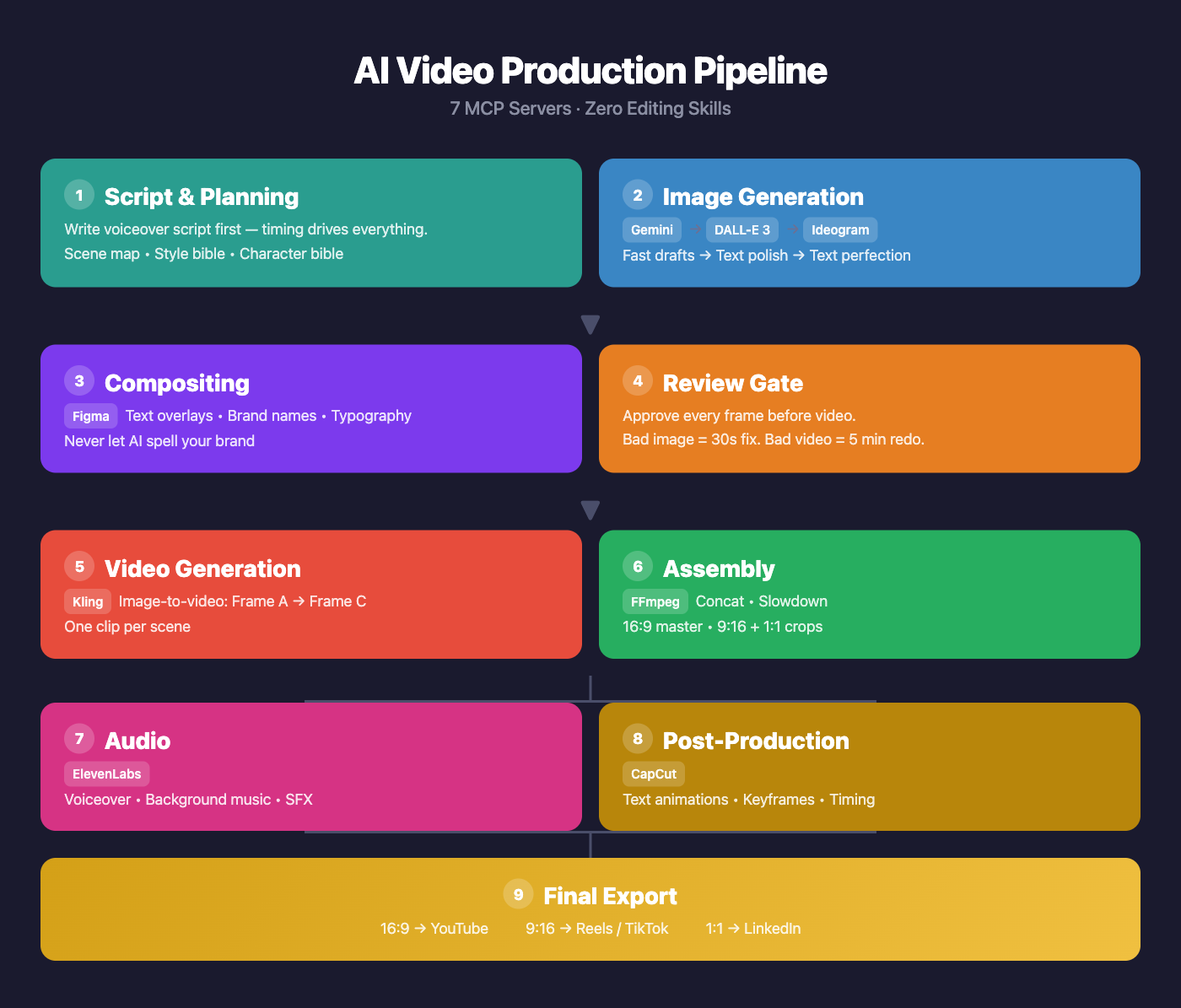
I built a concept video for my startup using 7 different AI tools, all orchestrated from a single CLI. No Adobe suite. No video editing skills. Just MCP servers chained together in a pipeline.
Here is the exact workflow I landed on after a painful V1 that produced blurry text and garbled labels in every frame.
The 7 MCP Servers
| Step | Tool | What It Does |
|---|---|---|
| Drafting | Nano Banana (Gemini) | Fast image iterations with style bible prompts |
| Text Polish | DALL-E 3 (OpenAI) | Best text accuracy in generated images |
| Text Perfection | Ideogram | Purpose-built for legible text in images |
| Compositing | Figma | Text overlays, brand names, typography |
| Video Gen | Kling | Image-to-video with motion between frames |
| Editing | CapCut | Text animations, keyframes, timing |
| Voiceover | ElevenLabs | Warm narrator voice, tuned stability & style |
The 5 Rules That Saved V2
1. Image-first, always
Fixing a bad image takes 30 seconds. Fixing a bad video means re-running a 5-minute Kling generation job. Perfect every frame before it touches the video pipeline.
2. AI cannot spell your brand name
Every AI image generator will garble text — especially brand names, numbers, and labels. Generate the image without text, then composite text in Figma where you have pixel-perfect control.
3. Script drives everything
Write the voiceover script before generating a single image. The narration timing determines how long each scene needs to be, which determines how many frames you need, which determines what you generate. Work backwards from the script.
4. Batch and review
Generate all frames in one batch. Review them together as a set — you will catch inconsistencies (lighting, character design, color palette) that you would miss reviewing one at a time. Then do a fix-pass on only the failures.
5. Style bible + character bible
Define a style prefix that gets prepended to every generation prompt. Mine was:
“LEGO stop-motion style, Pixar-quality character design, cinematic 16:9 composition, warm golden lighting, shallow depth of field, photorealistic LEGO miniature photography.”
Then define a character bible for your protagonist so they look consistent across all 9 scenes. Without this, every frame looks like a different movie.
What I Would Do Differently
Start with Ideogram for any frame that needs text. I wasted cycles trying to get Gemini and DALL-E to render readable labels. Ideogram is purpose-built for this — should have gone there first for text-heavy scenes.
Use continue_editing more aggressively. Small tweaks (adjust lighting, shift an object) do not need a full regeneration. The iterative editing tools in these MCP servers are underused.
Set up a review gate before video generation. In V1, I went straight from image gen to Kling. Bad images became bad videos that I then had to throw away. The explicit pause-and-review step saved hours in V2.
The Result
A 90-second concept video, 9 scenes, 18 frames, assembled from scratch — all from a terminal. No Premiere. No After Effects. No video editing experience required.
The AI video stack is not perfect. Text rendering is still the weakest link. But the pipeline is real, it is reproducible, and it is getting better every month as these models improve.
If you are building a product and need a concept video, this workflow will get you 80% of the way there in an afternoon.